
Setup Calculator
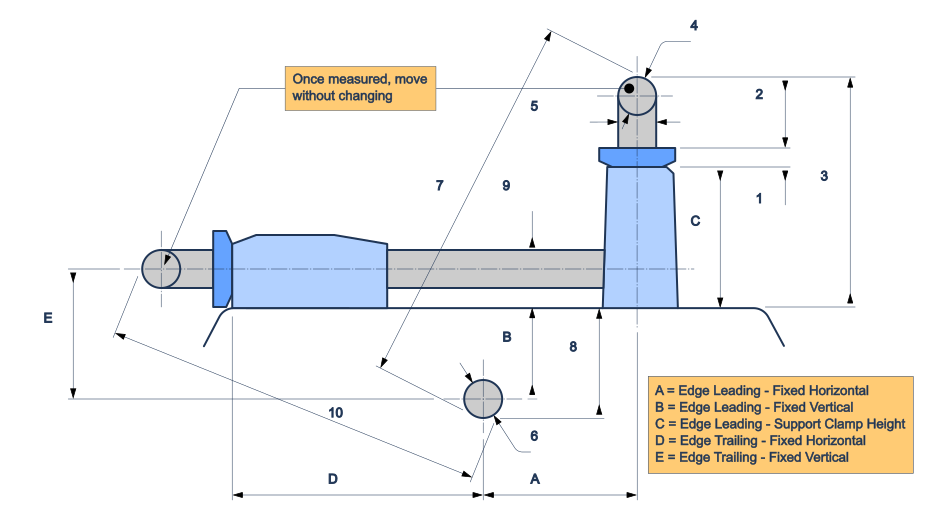
Get your Tormek T-8 (or similar wheel-type grinder) measurements for the JigSteps app using a 200mm caliper and a set-square — making use of the support bar simplfies the difficult horizontal fixed measurements.
How this works, in order:
- Remove the water trough and grinding wheel.
- Measure the adjusting nut thickness (measurement 1) on your support, then lock the support to a low position — lower gives better angle resolution later.
- With the support in this edge-leading position, slide away the shaft washer and take measurements 2–8 below, in numbered order.
- Carefully move the same support and lock into the edge-trailing position, taking care not to change its height setting in the process — a strip of tape over the adjustment nut is a cheap insurance policy.
- Take measurements 9-10.
- Your five results (A–E) fill in automatically as you go — enter them into the Edge Leading / Edge Trailing sections of Add Machine in the app.
Fields 7 and 10 are outside-to-outside caliper readings — take care to keep caliper both square and parallel to the support / shaft centrelines. Lightly pressing the body of the caliper against the machine casing helps keep it square.
Fields accept up to 6 digits, e.g. 123.45 or 12.345 — units aren't shown, so don't mix mm and inches.
Tab between numbered measurements.
Notes
- Built around the Tormek T-8, but works for any wheel-type grinder sharing similar geometry to the diagram above.
- All ten measurements (needed for both edge leading and trailing use cases) should be taken with the grinding wheel removed.
- If a result shows "Check" instead of a number, one of its measurements is likely inconsistent — double check the caliper readings for that pair.