
Setup Calculator
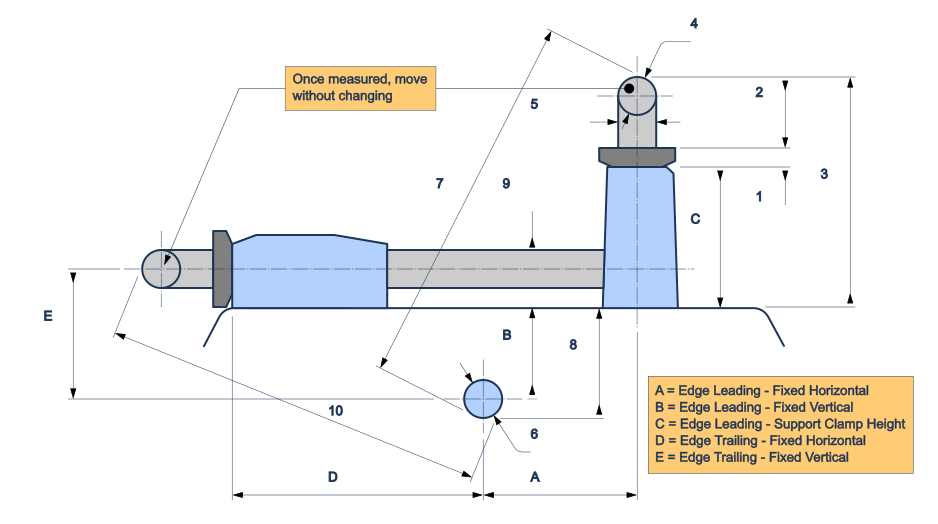
Get your Tormek T-8 (or similar Wheel Type grinder) measurements for the JigSteps app using a caliper and a set-square — making use of a support bar simplifies the difficult horizontal fixed measurements. Results are entered into a new Machine setup.
← Back to Machines setup — come back here any time, your results stay on screen while you switch between the two pages.
How this works, in order:
- Remove the water trough and grinding wheel.
- Measure the adjusting nut thickness (measurement 1) on your support, then lock the support to a low position — lower gives better angle resolution later.
- With the support in this edge-leading position, slide away the shaft washer and take measurements 2–8 below, in numbered order.
- Carefully move the same support and lock into the edge-trailing position, taking care not to change its height setting in the process — a strip of tape over the adjustment nut is a cheap insurance policy.
- Take measurements 9-10.
- Your five results (A–E) fill in automatically as you go — enter them into the Edge Leading / Edge Trailing sections of Add Machine in the app.
Fields 7 and 10 are outside-to-outside caliper readings — take care to keep caliper both square and parallel to the support and shaft centrelines. Lightly pressing the body of the caliper against the machine casing helps keep it square.
Pinch to zoom, drag to pan
Units aren't required, just don't mix mm and inches.
Tab between numbered measurements.
Measurements 1 (Adjustment Nut Thickness) & 4 (Support Diameter) are part of that Support setup.
Notes
- Built around the Tormek T-8, but works for any wheel-type grinder sharing similar geometry to the diagram above.
- If the edge-trailing support is below the wheel shaft, the calculator cannot be used reliably (in which case stop at measurement 8). Result E must otherwise be determined as a vertical centre-to-centre measurement and saved as a negative number.
- If your machine only has one edge-leading or edge-trailing position, enter zero values for the 'missing' position.
- If a result shows "Check" instead of a number, one of its measurements is likely inconsistent — double check the caliper readings for that pair.